 Start with where the creations live
An app that keeps everything on one device can suit a family that wants a simple personal archive. Check how to copy it elsewhere and restore it if the phone is lost. Keeping something on a phone does not tell you whether it is backed up.
Some apps use iCloud to sync between Apple devices signed in to the same Apple Account. Check separately for Android or browser access, and for sharing with relatives using their own accounts. Cloud storage alone does not tell you which of those an app supports.
Little Binder stores your family’s synced creations on servers we run in the United States. Once a creation finishes sending, you can sign in on another supported device to find it. It works in a browser, including on iPhone and iPad. The Android app is on Google Play in the United States and Canada; the iPhone and iPad app awaits store approval. See using Little Binder on different devices.
Check what happens without a connection
Offline saving lets you work without internet. Sync sends changes between devices. A separate backup gives you another copy to keep. An app may offer one without the others.
In Little Binder's installed app, new offline creations wait on that device until they finish sending. Open the app with an allowed connection to let them continue. Losing the device or clearing its data before then can lose that work. Do not assume the whole archive is available offline.
Where the pictures go
Look for an explanation of what leaves your phone: the full image, a smaller copy or the words from a recording. Check which companies receive it and who can open it.
In Little Binder, saving a creation sends it to our service for syncing, including when AI is off. Your family’s creations are stored on our servers in the United States. Our encrypted backups are also in the United States.
To help with a creation, our support staff need a grown-up's permission. We record that permission and limit how long it lasts. Separate, restricted access can be needed for security, legal or serious safety reasons.
AI you can choose
Check whether AI is optional, what it sends for processing and whether the provider can use it for training.
Little Binder's family AI assistance and voice-note transcription are separate choices that start off. AI runs on systems we operate in the United States. We do not use third-party AI services. Your children’s artwork, voice notes and other family content are not sent to AI companies or used to train AI models. Our privacy policy explains these choices and access rules.
 Choose who can see the artwork
Look for a way to share selected creations without handing over your own sign-in. Check what a relative sees and how to stop sharing.
In Little Binder, invite someone you trust, then choose creations to share after they accept. Optional automatic sharing has its own controls. There are no public profiles or ads. Ending access cannot recall a print or copy someone already saved.
 Try a creation with more than one page
A folded card has an inside. A comic might have six pages. Check that an app can keep those parts together, and that recordings can stay with the artwork.
Little Binder keeps multipart creations together and lets your child add a voice note. Recording is optional. It preserves the things they make, including drawings and handmade projects.
 Finding something years later
Try finding a drawing when you cannot remember its title. A voice recording and a search you can speak are different features.
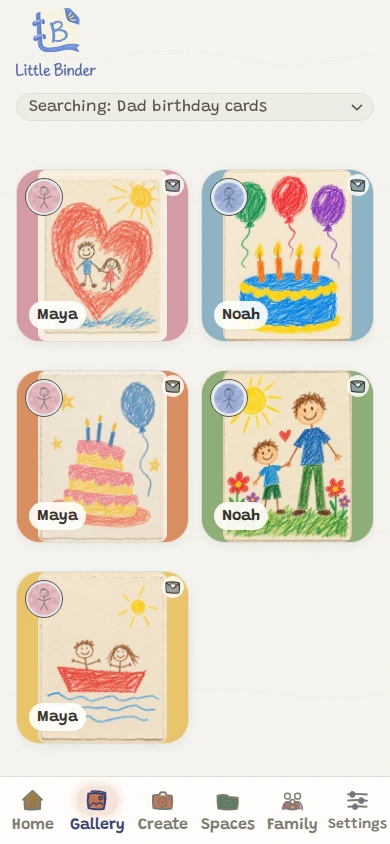
In Little Binder, type a search or, with family AI assistance enabled, choose Speak. Ask for something you remember, such as birthday cards for Dad. Search can use saved titles and existing written voice notes. The voice-search guide explains recognition and its separate choices.
Keep a copy you can open separately
Before building a large archive, try an export. Check that you can open the images and play the recordings outside the app.
Little Binder offers an authorized family export with saved media and accompanying information. Download it and check the result. Service backups are not a way to recover something you permanently deleted. Our privacy policy explains access and retention.
Read the free limits before starting
Check whether free means a trial, a limited archive or free capture with paid extras.
Little Binder's free plan includes 10 creations and two invitations, with no card required. Deleting a creation or removing an invitation does not restore the allowance. Saved work stays viewable, shareable and downloadable at the limit.
The Family plan is US$7.49 per month or US$71.88 per year, renewing until canceled. Unlimited creations covers normal family use, including short voice notes. See plans and prices.